
Guide to Using PizzaBlab’s Pizza Dough Calculator
This guide will provide you with the necessary steps to use PizzaBlab’s pizza dough calculator effectively. Although the calculator may seem complex and overwhelming at first, fear not. Once you grasp the underlying principles (which won’t take long), you’ll be able to effortlessly make dough that perfectly suits your preferences
PizzaBlab’s Pizza Dough Calculator: Introduction
PizzaBlab’s dough calculator is not just another pizza dough calculator – it is the ultimate calculator for making pizza dough (or any yeast dough, actually). With this tool, the process of preparing the dough recipe becomes simple and easy.
Not only does PizzaBlab’s dough calculator simplify the preparation process, but it also offers two unique features that are not found in other pizza dough calculators, especially in combination:
Calculating the Required Amount of Yeast Based on Fermentation Time and Temperature
Using the correct amount of yeast is the key to successful fermentation. PizzaBlab’s dough calculator allows you to determine the ideal amount of yeast based on fermentation time and temperature, making it an invaluable tool for any yeast-leavened dough.
Most recipes for yeast-leavened dough found on the Internet often recommend using WAY too much yeast. The intention behind this is to ensure the ‘successful’ fermentation of the dough under any circumstances and at any temperature. However, this practice has significant consequences on the dough, such as a bad aftertaste resulting from the excessive amount of yeast used, and of course, the risk of overfermentation.
PizzaBlab’s pizza dough calculator utilizes a predictive model of yeast activity developed by TXCraig1 from pizzamaking.com, and has been refined through extensive trial and error by myself and others to ensure the highest level of accuracy. By using this calculator, you can achieve ideal dough fermentation, eliminating any issues of over-fermentation or under-fermentation.
Go ahead and give it a try – PizzaBlab’s pizza dough calculator is already being used by hundreds of people every day!
There are variables that cannot be taken into account and put into a simple formula; For example, varying temperatures during fermentation, different dough management processes, final dough temperature and the vitality of the yeast – all have a significant effect on how the dough ferments. Therefore, the calculator provides an excellent starting point for the amount of yeast, however, the suggested amount of yeast is not set in stone, and you may need to make slight adjustments through trial and error.
Calculating the Amount of Dough Needed Based on Pizza Size (Round or Rectangular) and Desired Thickness
PizzaBlab’s dough calculator makes it easy for you to determine the amount of dough required for your pizza, whether it’s round (based on diameter) or rectangular (based on length and width).
This calculation is based on a value called the Thickness/Loading Factor, which helps determine the dough quantity based on the desired size and thickness of the pizza.
Note: The thickness factor is not the actual thickness of the pizza. It is used as a relative, numerical factor for calculation purposes).
All you need to do is enter the thickness factor (values for different styles of pizzas can be found in the link above) and the size of the pizza, and the quantity of dough will be adjusted automatically.
This function is unique to PizzaBlab’s pizza dough calculator. It allows you to:
- Determine the amount of dough needed for pizzas baked in any size pan.
- Calculate the amount of dough required for round pizzas of various sizes.
- Adjust the thickness of the pizza to your preference, regardless of whether it’s rectangular, round, or pan-baked.
Additional Features
PizzaBlab’s pizza dough calculator automatically saves all the data entered (i.e. the dough recipe). This means that you can revisit the calculator page at any time and the recipe will be fully restored, as long as you log in from the same device. It is recommended to add the calculator page to your computer/phone favorites (or even create a shortcut on your phone’s home screen) for easy access whenever you need it.
Furthermore, the calculator also includes a share option. This feature allows you to send a link to the calculator page along with the recipe you have entered. When the recipient clicks on the link, the calculator page will open, displaying all the data that was entered at the time of sharing. This function is particularly useful if you want to share the recipe with others or if you want to save it for future reference.
General Instructions for Using PizzaBlab’s Pizza Dough Calculator
Before using the calculator, it is important to have a basic understanding of a few key points:
- The calculator is based on baker’s percentages, which is the “language” commonly used in the baking world and specifically in pizza making. All ingredients are calculated based on the weight of the flour, which is always set at 100%.
- If the term “baker’s percentage” is new to you, or if you are not entirely sure that you understand what it means, see: A Guide to Baker’s Percentages: The Mathematical Language of Pizza.
- For a list of pizza dough formulas and ingredient % for use with the calculator (in baker’s percentages), see: Pizza Dough Formulas for All Common Pizza Styles (in Baker’s Percentages).
- To display the final quantities of the ingredients, the calculator requires entering all the basic dough data: dough weight/dimensions, amount of balls, water and salt percentages, preferment quantities (if using preferment), as well as fermentation temperature and duration. Without this information, the calculator will display zero quantities, as there is no basis for calculation.
- The calculator can be used for any dough containing yeast, not just pizza. To calculate, simply enter the total amount of dough in the “Single Dough Ball” field. The rest of the calculation remains the same for any other type of yeasted dough.
1. The General Structure of PizzaBlab’s Pizza Dough Calculator
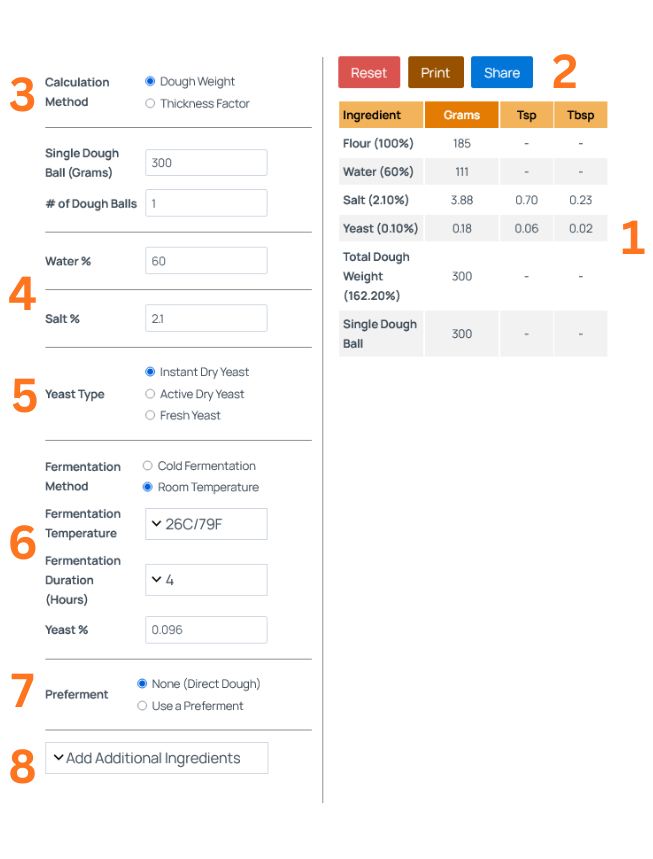
On the left side of the calculator (or at the top if you are on mobile), the fields for entering the data are displayed. On the right side (or at the bottom if you are on mobile), the ingredient quantity table shows the quantities of ingredients based on the entered data.
The ingredient quantity table displays all the dough ingredients, including the percentage of each ingredient and, of course, the final amount of each ingredient in grams.
In addition to the ‘grams’ column, there are two additional columns for ‘tbsp/tbsp’ (tablespoon/teaspoon) measurements, which indicate the volumetric amount of ingredients (excluding water or flour).
However, I STRONGLY recommend weighing all the ingredients rather than relying on volumetric measurements.
In the ingredient quantity table, you can find the total weight of the dough (“total amount of dough”), as well as the weight of a single ball.
2. Reset, Print and Share
Reset button: Resets all fields on the calculator.
Print button: Clicking this button opens the recipe on a separate “clean” page intended for printing.
Share button: By clicking this button, a shareable link to the calculator page is copied to the clipboard (including all entered data).
3. Calculation Method – Dough Weight or Thickness Factor
You can calculate the amount of dough based on either the desired weight of the dough or the desired thickness factor of the pizza.
Calculate Using Dough Weight
Single Dough Ball (Grams): Enter the desired weight for a single dough ball.
# of Dough Balls: Enter the desired quantity of dough balls (the total amount of dough will be calculated based on the weight of the ball entered in the previous section, multiplied by the number of balls entered).
Calculate Using Thickness Factor
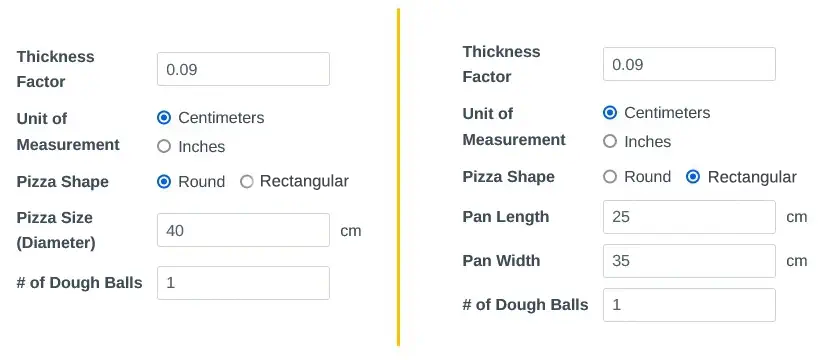
Thickness Factor (TF):
Enter your desired thickness factor.
To learn what the Thickness Factor is and how to use it, along with TF values for different pizza styles, see: Thickness Factor (Loading Factor) in Pizza Explained: A Technical Guide.
Unit of Measurement:
Select the unit of measurement (centimeters/inches).
Pizza Shape (Round/Rectangular):
Select the shape of the pizza. For a round pizza, enter its size (diameter). For a rectangular pizza, enter the length and width of the pan in which it is baked (or the length and width of the pizza if it is not baked in a pan).
# of Dough Balls:
Enter the desired quantity of dough balls (the total amount of dough will be calculated based on the weight of the ball entered in the previous section, multiplied by the number of balls entered).
4. Amount of Water and Salt
Enter the desired percentages of water (dough hydration) and salt for the dough.
For standard pizza dough:
- Water: Between 56-62%.
- Salt: Between 2-3%.
5. Yeast Type
Choose the type of yeast that you intend to use in the dough. It is crucial to select the correct type of yeast, as the calculations vary for each type.
6. Yeast Calculation [for the Final Dough]
Fermentation Method: Choose the fermentation method – cold fermentation (in the fridge) or room temperature fermentation. Depending on your choice, you can specify the fermentation temperature in the next field.
For cold fermentation, the calculator provides an amount of yeast that may appear higher than what you are accustomed to. This quantity is specifically intended for a dough management process known as the ‘Lehmann method’. This method involves balling the dough and promptly placing it in the refrigerator after kneading. A comprehensive post on this topic will be published in the future. You can read more about it in the following article (recommended): How to Cold Ferment Pizza Dough: Guide to Cold Fermentation (2 Methods).
Fermentation Temperature: Choose the temperature at which you intend to ferment the dough. It is essential to be as precise as possible when selecting the temperature because it is the primary factor that affects the fermentation rate.
If you are fermenting in the fridge and unsure about which temperature to choose, opt for 4C/39F, as this is the average temperature in most refrigerators.
Fermentation Duration (Hours): Choose the fermentation duration carefully to ensure accuracy and avoid over or under fermentation. This is particularly crucial when doing room temperature fermentation.
The fermentation durations are determined based on commonly used times and are presented according to the chosen method of fermentation (refrigerator or room temperature).
Please note that the fermentation duration refers to the period starting from the END OF KNEADING until the pizza is baked, regardless of the fermentation method used. Whether you add folds or perform other actions with the dough after kneading, the fermentation process effectively begins when the yeast starts “working” in the dough, which is when it is incorporated into the dough.
When using a preferment, the fermentation duration refers to the final dough after incorporating the preferment. In other words, when selecting the fermentation duration, only consider the fermentation duration of the FINAL dough.
For example, if you made a preferment that fermented for 10 hours and the final dough is going to ferment for 4 hours, input 4 hours as the fermentation duration into the calculator.
Yeast %: The calculator will automatically display the calculated yeast percentage. You can also manually edit this field if, for example, you want to enter your own value or make a slight adjustment to the calculated value.
7. Preferment Section
To learn about preferments, see: Pizza Preferment Masterclass: The Science of Poolish, Biga, and Beyond.
None (Direct Dough)
For making a direct dough (no preferment).
Using a Preferment
PizzaBlab’s dough calculator is designed to handle the complexities of multi-stage fermentation automatically. When using a preferment, the calculator determines the precise yeast requirements for both the preferment stage and the final dough stage.
How the Calculation Works
- Preferment Yeast: The calculator calculates the yeast needed to ferment the preferment, based on your specified time and temperature.
- Final Dough Yeast: It then calculates the total yeast required for your final dough’s fermentation profile and subtracts the yeast already present in the preferment.
Step 1: Setting up the Preferment
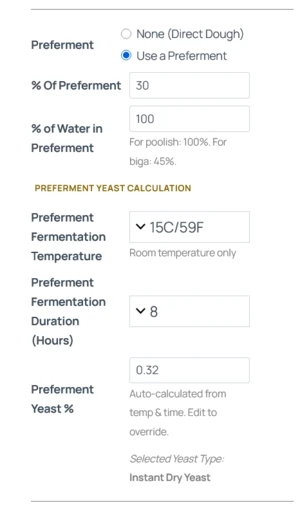
In the Preferment section, select “Use a Preferment.” You will see fields for the percentage of flour used and the hydration (e.g., 100% for Poolish, 45-50% for Biga).
Enter the time and temperature* at which you plan to ferment the preferment. The calculator will automatically determine the yeast amount needed for the preferment.
1. Fermentation Temperature: The preferment calculation is limited to room temperature only. As detailed in the preferment masterclass article, preferments should be fermented at room temperature to properly develop.
Important: Preferment Yeast Logic
1. Fermentation Temperature: The preferment calculation is limited to room temperature only. As detailed above, preferments should be fermented at room temperature to properly develop.
2. Yeast Type: The calculator automatically uses the same yeast type for both the preferment and the final dough (the one you chose for the final dough).
Step 2: Defining the Final Dough Fermentation
In the final dough fermentation section, enter the time and temperature for your final dough (the period after you mix the preferment with the remaining ingredients).
The calculator will now:
- Calculate the total yeast needed for the entire recipe.
- Subtract the yeast already added to the preferment.
- Display the remaining yeast you need to add to the final dough.
Understanding the Results
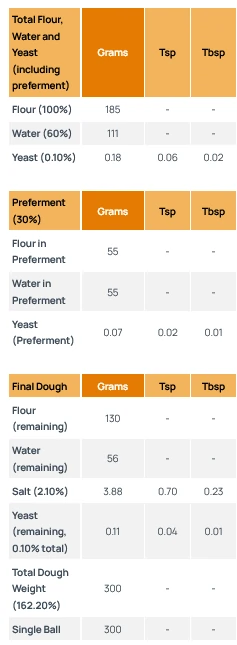
The results table will be split into three sections:
- Totals Table: Shows the total flour, water and yeast (including the preferment).
- Preferment Table: Shows the four, water, and yeast for the preferment.
- Final Dough Table: Shows the remaining flour, water and yeast to add to the final dough, including other ingredients (salt, oil etc.).
Note: When No Extra Yeast is Needed
In certain scenarios, specifically long room-temperature fermentations , the yeast required for the preferment may actually meet or exceed the total yeast needed for the final dough.
If this happens, the calculator will show “-” for the Yeast (Remaining) in the Final Dough table. This simply means the fermentation activity from your preferment is sufficient to ferment the final dough, and you do not need to add any additional yeast during the final mix.
8. Add Additional Ingredients
You have the option to include more ingredients in the dough. The available choices are sugar, fat, milk, vital wheat gluten, malt powder, or ‘other’ (any other ingredient). If necessary, you can also eliminate any of the added ingredients by clicking on the red X located to the right of the respective field.
Please note that for this section, in terms of calculations, it is not important which specific ingredient you choose. The calculation process will be the same for all ingredients, with the only difference being the appearance of a different word in the ingredient quantity table. The “names” of the ingredients are solely for convenience, as each ingredient is ultimately calculated using baker’s percentages based on the weight of flour.
Bowl Residue/Waste Compensation (%)
This option, found under the “Add Additional Ingredients” section, allows you to input a percentage to account for dough lost due to residue left in the bowl. The calculator adds the calculated dough amount to the total dough weight, adjusting the ingredient quantities accordingly, including the dough that’s expected to be lost.
That’s it, now that you’re an expert – go ahead and use the calculator to make some dough 🙂

Enjoyed this article? Join the BLAB
Unlock the Key Takeaways above and enjoy a 100% clean, ad-free experience across the entire site.


Hello, would it be pissible to implement a Mix fermentation, since I love to Bulk for 1-2h RT before putting the dough into the fridge and it needs 3-4h RT after fridge to be rdy to be baked. This should included or am I missing something?
The article on preferment types is primo, thorough but easily digestible. While I’m a relative beginner when it comes to yeast, I don’t see any reason why this couldn’t be used for making loaves as well. Am I right about that? And if so, would I just include proofing time in the loaf pan in the overall fermentation time?
Hi James, thank you!
You’re absolutely right – the calculator can indeed be used to calculate yeast quantities for any yeast-leavened dough (I even included a note about that on the calculator’s page). The only exception is sugar-rich doughs containing more than 5% sugar (in baker’s %). In those cases, you’ll need to multiply the yeast amount the calculator provides by 1.5–2x, since osmotic pressure inhibits yeast activity.
And yes, when selecting fermentation time in the calculator, it refers to the entire fermentation period, starting right after mixing and ending when the dough goes into the oven.
Hey, can you please explain a bit more in detail how to use the calc with poolish?
I don’t Unterstand how to know how much yeast I need for the poolish dough.
And is the poolish always fermented in RT?
Thank you very much 🙂
Hi Dario,
You’ll find all the information you need on preferments, including instructions on how to use it with the calculator, in this article: Guide to Preferments: What Is a Preferment, Its Effects on Dough, Preparation, and How to Use It
Hi Yuval,
Thanks for all the interesting and informative articles. It was an epiphany to read some of your topics. Interested in trying out your calculator but I use a no-knead method; that is, I stretch and fold my dough over a span over 2 hours before popping in the fridge for CF. How would you recommend adapting the calculator outputs to account for a no-knead method?
Thank you for the great work.
Hi Jon,
I’m so glad to hear that!
Regarding your question, you can place the dough in the fridge and perform the stretch and folds directly from there – simply take the dough out, fold it, and return it to the fridge. The dough may feel more elastic when cold, but it should work just fine 🙂
Hi, your instructions mention to be very accurate about the fermentation time . But at the same time, the calculator only allows for 6 to 8 hour increments. Is there a reason for that?
Hi Perla,
The 6-8 hour increments apply specifically to cold fermentation. Because dough ferments much more slowly in the fridge, small variations in time, and consequently, yeast quantity, have a much smaller impact on how fast the dough ferments.
In contrast, fermentation at room temperature happens much faster – even a single hour can be the difference between a perfectly fermented dough and one that is over-fermented. The fridge provides a much wider usability window, which is why the calculator uses these larger increments for cold fermentation.